


Most advice about charity themes starts with the demo: which one looks warmest, which has the nicest donate button. I think that's the wrong place to start. The bigger decision is how you're going to take donations and who will look after the site in two years, because those two answers rule out most of the options before you've looked at a single screenshot.
So this isn't a ranked list. It's a look at the four ways people usually build a charity site on WordPress, with what each one asks of you. We make the Kindle themes, which appear in the last two sections, so read those with that in mind. Everything I say about other products comes from their public WordPress.org listings, which I read on 17 November 2026. I haven't run any of them on a live charity site, and listings change, so check the current page before you decide.
Start with how you'll take the money
Before you compare a single theme, answer three questions.
Do you need monthly gifts? Most charities do, because regular donors are worth far more over time than one-off ones. Not every setup includes this for free.
Where do the payments go? You want donations landing in your own Stripe or PayPal account, not passing through a middleman who takes a cut or holds the money.
Who will fix it when something breaks? A small charity often has one volunteer who "does the website". If that person leaves, will the next one understand how it was put together? The fewer separate pieces there are, the easier that handover is.
Hold on to those three, because they decide which of the routes below makes sense.
Route 1: a free nonprofit theme plus GiveWP
WordPress.org has a handful of free themes made for charities. Two that looked current when I checked:
Charity Nonprofit, from omegathemes, needs WordPress 5.5 and PHP 7.2 or newer and was updated on 11 November 2026. Its listing mentions sections for fundraising, volunteers, events and galleries, plus donation buttons, and it says donations are managed through the GiveWP plugin. It has only 30+ active installations, so there's very little public track record to go on.
Revive Charity, from Rara Themes, needs PHP 7.4 or newer. The listing shows version 1.0.1 from 18 November 2025, with 90+ active installations, and sections for causes and donations that work with the Give plugin.
Both are free, with paid upgrades and support on offer. The donation side is GiveWP, which has more than 100,000 active installations. Its free version includes Stripe and PayPal. Recurring donations are a paid add-on, and the plugin page says additional fees may apply for free users, without giving a number. Read GiveWP's own fee explanation before you rely on the free version for serious money. Our comparison of donation plugins goes into fees and recurring giving in more detail.
This route is the cheapest, and for a very small group with a comfortable volunteer it can work well. The catch is that you now have a theme from one maker and a plugin from another, and after a big WordPress update it's you who finds out whether they still get along. Check the last update date on both before you commit.
Route 2: a general-purpose theme plus a donation plugin
Another option is to ignore charity themes completely. Astra, for example, has over a million active installations, and its WordPress.org listing describes a general theme that works with page builders and WooCommerce. It says nothing about donations or nonprofits, so the causes page, the events page and the "where your money goes" page would all be yours to build.
That freedom is useful if a designer or agency already works on your site. Without one, it's the slowest route of the four, because you're assembling everything from blocks rather than editing a finished design.
Route 3: one theme that does it all
Kindle is our charity theme, and it takes a different approach: donations are part of the theme instead of a separate plugin. The product page lists:
- preset and custom donation amounts, one-off or monthly, paid through your own Stripe keys;
- a causes directory with progress bars, donor counts and days left, and a page for each cause;
- supporter fundraising, so someone can start their own page for a birthday or a sponsored run;
- events with an RSVP form, a volunteer application page, and a transparency page with a fund allocation chart;
- forms that save as enquiries in your WordPress dashboard, with email notifications and spam protection.
Every page is built with the free Elementor plugin, which the demo import installs for you, so staff can change text and images without touching code. It needs WordPress 6.0 and PHP 8.0 or newer. Plans start at $59 a year for one site, and there's a $399 lifetime option.
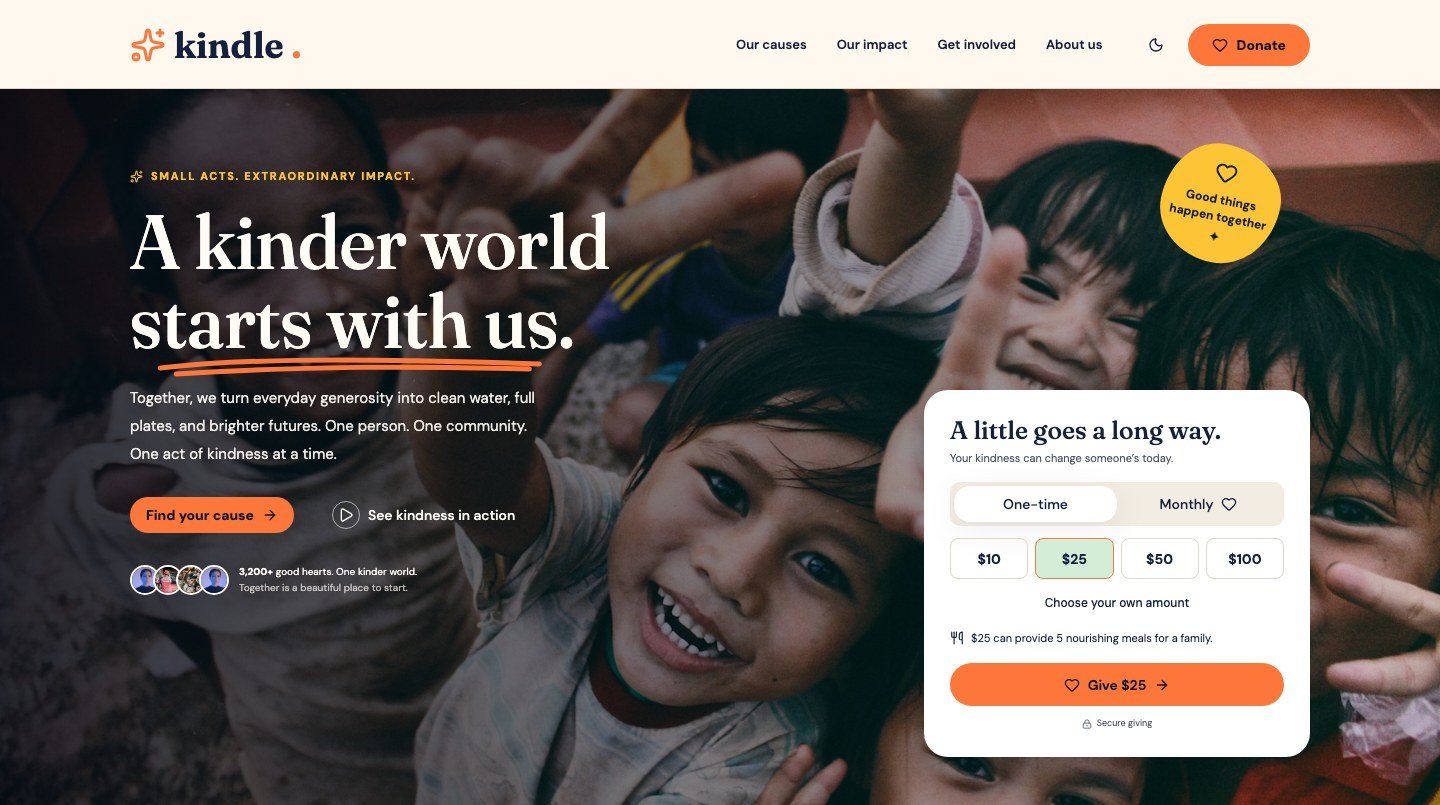
Here is where it falls short, and you should weigh these honestly. Donations are built around Stripe, and the feature list doesn't mention PayPal, Gift Aid or tax-receipt handling. If your charity depends on any of those, you'd need to check the documentation and probably add a plugin. Kindle is also new. It was first released this autumn, so it doesn't have the years of reviews and update history an older theme can show. And the people, figures and stories in the demo are made up, so you have to replace them with your own before launch. You can look around the live demo before paying anything.
Route 4: a crowdfunding theme
If lots of people will start their own campaigns on your site, a single-charity theme is the wrong shape. Kindle Crowdfunding is built for that. Organisers fill in a five-step form, you review each campaign before it goes live, and every organiser gets a dashboard for their own campaigns and updates. Donations are one-time or monthly through Stripe, and backers can give anonymously.
It's more than a single charity needs. If you're one organisation running your own causes, Kindle is the closer fit.
The four routes side by side
| Free theme + GiveWP | General theme + plugin | Kindle | Kindle Crowdfunding | |
|---|---|---|---|---|
| Who takes the payment | GiveWP | A donation plugin | The theme, via Stripe | The theme, via Stripe |
| Monthly gifts | Paid add-on | Depends on the plugin | Included | Included |
| Charity pages ready made | Some sections | None | Yes | Campaign pages, not charity pages |
| Pieces to keep updated | Theme and plugin | Theme, builder and plugin | Theme and its companion plugin | Theme and its companion plugin |
| Cost to start | Free | Free to paid | From $59 a year | From $59 a year |
What I'd do in a few situations
These are examples, not a promise that one route suits everyone.
A five-person food bank with no budget and a volunteer who likes tinkering could reasonably start with route 1. I'd tell them to check both update dates and keep notes on how they set things up, so the next volunteer isn't guessing.
A charity that already pays an agency should ask the agency. They'll probably prefer route 2 because it matches how they work.
A single charity with no technical help, wanting donations, causes and volunteers in one place, is who Kindle was built for. Even then I'd suggest opening the demo on your phone first and checking whether the donation flow feels right for your donors.
A community fundraising platform with many organisers is a crowdfunding job, so Kindle Crowdfunding or something similar.
Before you pick any of them
- Open the demo on your phone. Most donors will.
- Make a test donation if the demo allows it, and count the taps from the home page to the thank-you page.
- Look for the page that shows where the money goes. If it isn't obvious within two clicks, donors won't find it either.
- Change a heading and a picture in the editor. If that takes more than a few minutes, your volunteers will struggle.
- Check when the theme and any plugin were last updated, and which WordPress version they support.
For a fuller checklist, see Charity WordPress Themes: How to Pick One for a Nonprofit.
Questions people ask
Do I need a donation plugin if the theme has a donate button?
Possibly. A donate button can be just a link or a style. Check whether the theme takes the payment itself or hands it to a plugin such as GiveWP. Kindle takes payments through your own Stripe keys, while the two free themes above rely on GiveWP.
Can a charity site take monthly donations?
Yes, but how depends on the route. With the free GiveWP plugin, recurring donations are a paid add-on. Kindle and Kindle Crowdfunding include one-off and monthly giving through Stripe.
Is a free charity theme good enough?
For a small site it can be, as long as it's still being updated and you're comfortable putting the donation side together with a plugin. Look at the last update date first. A theme nobody has touched in two years is a risk however good it looks.
Do I need Elementor Pro?
Not for Kindle or Kindle Crowdfunding, which work with the free Elementor plugin. For other themes, check whether their demo needs a paid builder.
Which should a charity with no developer choose?
The one with the fewest separate pieces to set up and update. For many small charities that means either a theme that includes donations, or a free theme and one well-known plugin.
Disclosure: Wow Themes makes Kindle and Kindle Crowdfunding. Facts about other products come from their public WordPress.org listings, read on 17 November 2026, and may have changed since.



Comments
No comments yet. Be the first to share your thoughts.