



If you're choosing a WordPress theme for a charity, NGO or community group, the theme decides how easily people can give, how much you can show about where the money goes, and how much work your volunteers face every time they update a cause. This guide gives you a checklist to judge any charity theme against, then shows how our own theme, Kindle, handles each point. Kindle is our product, so weigh that part the way you would any maker's own recommendation.
What a charity theme has to do
Take donations, including monthly ones
Find out first whether the theme takes payments itself or relies on a donation plugin. Either works, but they're different jobs. A theme that "supports donations" often means it styles the forms of a donation plugin such as GiveWP or Charitable, and you set that plugin up separately. Our comparison of WordPress donation plugins covers fees and recurring giving for each.
Look for preset amounts plus a custom amount, one-off and monthly giving, and payments through your own payment account so the money goes straight to you.
Show causes with a goal
A cause page with a target and a progress bar gives a visitor a reason to give today. Check that each cause gets its own page with a story, photos and updates, and that causes can be filtered by category once you run more than a handful.
Events, volunteers and supporter fundraising
If you run events, you want an RSVP form that saves responses somewhere you can find them. If you rely on volunteers, a roles page with an application form saves a round of emails. Peer-to-peer fundraising, where supporters create their own page for a birthday or a sponsored run, is rarer in themes. If you need it, check for it by name.
Build trust
Donors look for proof. A "where your money goes" page, annual reports to download, and real names and photos of your team all help. Check the theme has layouts for these, not just a hero image and a donate button.
Be editable by whoever maintains it
Most small charities don't have a developer on call. A theme built on a page builder lets staff change text and images without code. Check whether it needs a paid builder such as Elementor Pro, which adds a yearly cost.
Load quickly on phones
Run the theme's demo through Google PageSpeed Insights before you buy and look at the mobile result. A demo that's slow with sample content won't get faster with yours. Our guide to front-end WordPress performance explains the numbers.
Requirements and support
Check the minimum WordPress and PHP versions, the date of the last update and how long support lasts. A theme that hasn't been updated in two years is a risk however good it looks.
How Kindle covers the checklist
Kindle is the charity theme we build. Against the list above:
| Need | Kindle |
|---|---|
| Donations | Built in: preset and custom amounts, one-off or monthly, through your own Stripe keys. No separate donation plugin. |
| Causes | A causes directory with category filters, raised-vs-goal progress bars, donor counts and days left. Each cause has its own page with a story, gallery and updates. |
| Events | Event listing and detail pages with an RSVP form. |
| Volunteers | A volunteer page with roles and an application form. |
| Supporter fundraising | Supporters can start their own fundraiser with a goal and a personal story. |
| Trust | A transparency page with a fund allocation chart, an annual report section and downloadable documents. |
| Editing | Every page is built with the free Elementor plugin, which the one-click demo import installs. |
| Forms | Contact, newsletter, volunteer, fundraiser and RSVP forms are saved as enquiries in your dashboard, with email notifications and spam protection. |
| Requirements | WordPress 6.0 or newer, PHP 8.0 or newer. |
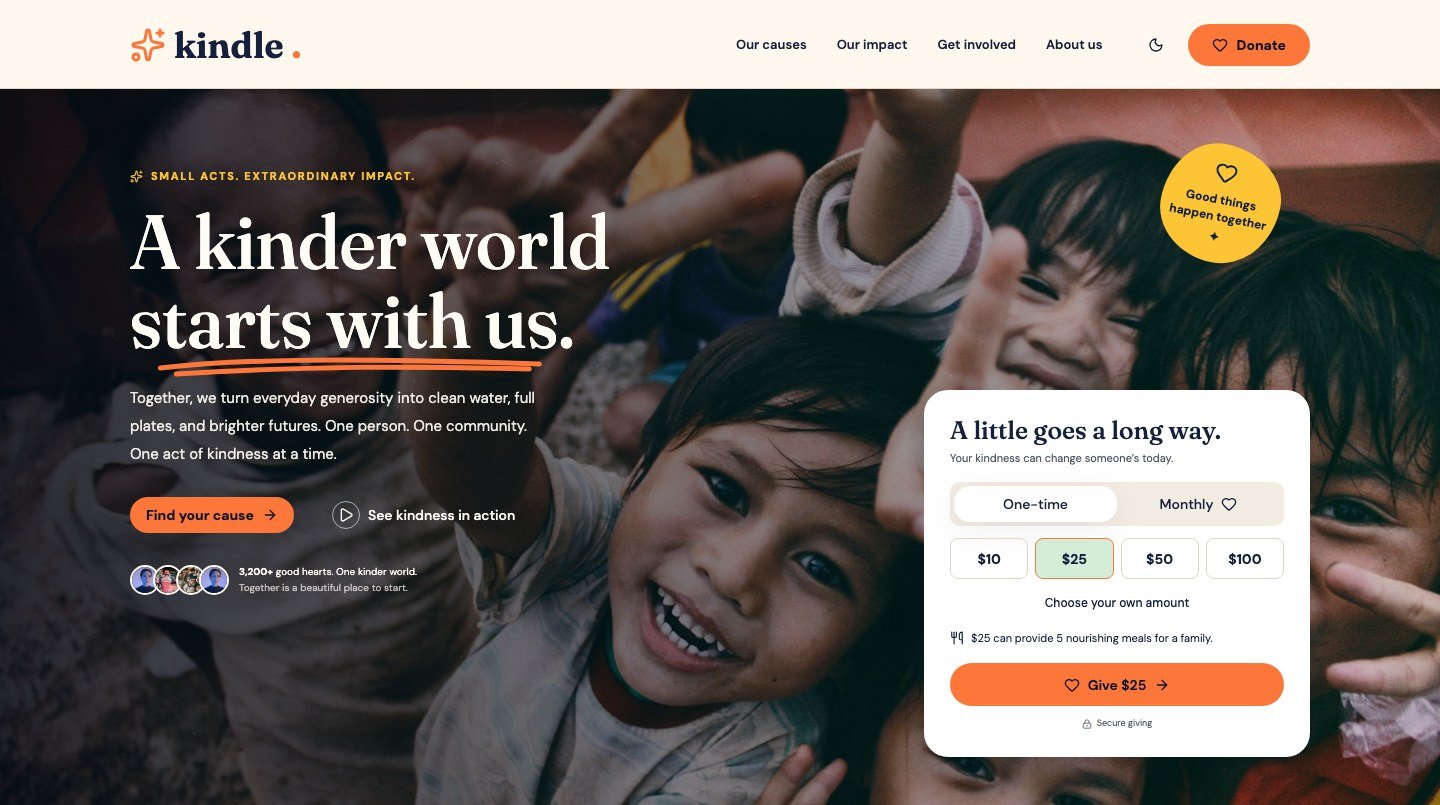
Try the Kindle demo, or read how donations are set up in Donations, forms and integrations before you buy.
A fair warning on limits: Kindle's donation feature is built around Stripe, and its feature list doesn't mention PayPal, Gift Aid or tax-receipt handling. If your charity needs any of those, read the documentation first and check whether you'd need to add a plugin. The demo content (the organisation, figures, stories and people) is fictional, so you replace it with your own verified information before launch.
How to compare any charity theme
Whichever themes make your shortlist, put each one through the same test:
- Open the demo on your phone. Most donors will arrive on one.
- Make a test donation, if the demo allows it, and count the taps from the home page to "thank you". Fewer is better.
- Find the money page. Can you see where donations go within two clicks?
- Check the editing. Change a heading and an image in the page builder. If it takes more than a few minutes, your volunteers will struggle.
- Read the documentation. Good docs mean fewer support emails later.
- Check the dates. When was it last updated, and which WordPress version was it tested with?
Shortlist two or three themes that pass, and choose the one that gets a visitor to "thank you" in the fewest steps. That is usually the right choice for your cause.

Written by
Allan Bond wrote the Wow Themes blog's early roundups of WordPress themes for creative studios, businesses and charities.


Comments
No comments yet.
Comments are closed on this post.