


If you're choosing a WordPress security plugin, this page compares six of the main ones: what each actually does, what you get in the free version, and which kind of site it suits. WordPress is attacked more than any other CMS for the simple reason that it runs more sites, and most of those attacks are automated scans for old plugins and weak passwords.
A plugin is one layer, not the whole job. Updates, unique passwords with two-factor login, and backups you've tested stop most attacks before a security plugin is ever involved.
Quick comparison
| Plugin | Firewall | Malware scan | Login protection | Free version | Best for |
|---|---|---|---|---|---|
| Wordfence | Yes, runs on your server | Yes | Yes, with 2FA | Yes | One plugin that does most things |
| Sucuri Security | Paid cloud firewall (DNS level) | Remote scan | Hardening options | Yes | Sites that want attacks stopped before they reach the server |
| All-In-One Security (AIOS) | Yes | File change detection (malware scan is Premium) | Yes, with 2FA | Yes | Owners who like to work through settings themselves |
| SecuPress | Yes | Pro only | Yes, with 2FA | Yes | A guided scan with one-click fixes |
| MalCare | Yes | Yes, on MalCare's servers | Yes | Yes | Sites that want cleanup handled if the worst happens |
| Kadence Security (formerly iThemes Security) | Brute-force protection | Site scanner | Yes, with 2FA | Yes | Locking down logins and user accounts |
Free and paid features change from time to time, so confirm the current split on each plugin's WordPress.org page before you decide.
Wordfence
Wordfence runs a firewall and a malware scanner on your own server. The free version includes both, plus login security with two-factor authentication and email alerts. The difference with Premium is timing: Premium gets new firewall rules and malware signatures in real time, while free users get them 30 days later. Premium also adds a real-time IP blocklist and country blocking.
Good to know: scans run on your server and use your hosting resources. On a small shared plan, schedule them for quiet hours.
Sucuri Security
The free Sucuri plugin is about monitoring and hardening: an activity audit log, file integrity checks, a remote malware scan, blocklist monitoring and a set of one-click hardening options. The firewall is a separate paid service that sits in front of your site at DNS level and also works as a CDN. Attack traffic never reaches your server, and higher plans add DDoS protection.
Good to know: to use the paid firewall, you point your domain's DNS at Sucuri. That's a bigger change than installing a plugin.
All-In-One Security (AIOS)
AIOS, from the team behind UpdraftPlus, covers a lot for free: login lockout, two-factor login, a file and PHP firewall, file change detection, user account checks, spam comment blocking and database hardening. Features are labelled basic, intermediate or advanced, so you can switch on the safe ones first.
Good to know: it's easy to turn on too much at once. Enable features in small groups and check your site after each one.
SecuPress
SecuPress scans your site and lets you fix many of the problems it finds with one click.
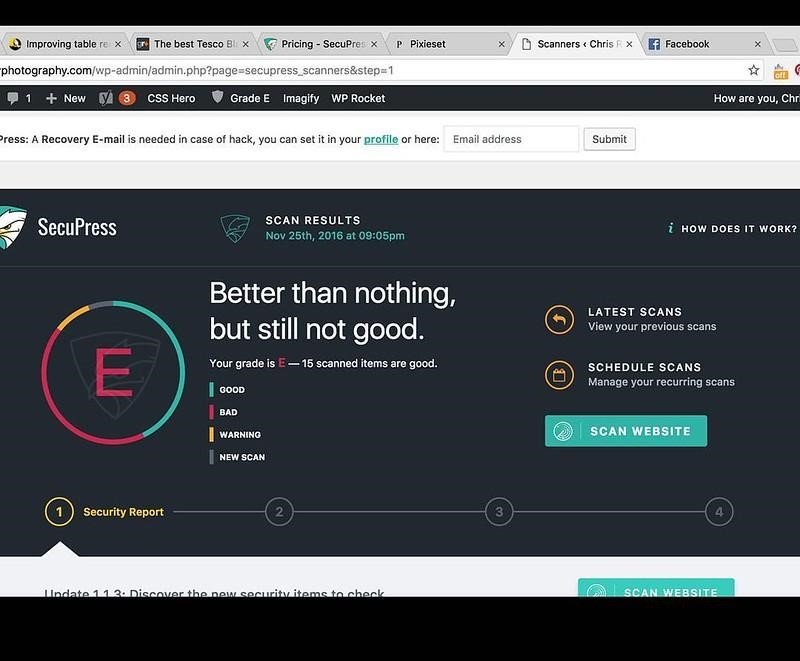
The free version includes firewall rules, brute-force and password-spraying protection, bad-bot blocking, IP blocking and two-factor login. Pro adds a malware scanner, country blocking, security alerts, detection of vulnerable plugins and themes, and PDF reports. WordPress.org now lists it as "SecuPress with Simple SSL".
MalCare
MalCare scans your site on its own servers, so scans don't slow your site down. The free plugin includes the scanner and a firewall, with firewall rules updated every 7 days. Paid plans update rules every few minutes and add one-click malware removal, which is the main reason people choose it.
Kadence Security (formerly iThemes Security and Solid Security)
This one is strongest on logins and users. The free version includes two-factor authentication, password rules, brute-force protection, user banning, file change detection and a site scanner. Passwordless login is a Pro feature.
Which one should you pick?
- One plugin and no extra services: Wordfence.
- You want attacks stopped before they reach your server: Sucuri's paid firewall.
- You'd rather work through the settings yourself, for free: AIOS.
- You want someone else to clean up if you're hacked: MalCare's paid plan.
- Your main worry is weak or stolen logins: Kadence Security.
Use one security plugin. Two firewalls can block each other and slow the site.
For a typical small business site, the free version of Wordfence or AIOS plus automatic updates and two-factor login is enough. Pay for a cloud firewall or a cleanup plan when downtime would cost you real money, for example on a busy shop.
If you've already been hacked
A security plugin won't undo a hack on its own. Work through our step-by-step hacked WordPress recovery guide first, then install one of the plugins above. Scanners and firewalls add some load, so if the site feels slower afterwards, see how to speed up WordPress with server caching.
SecuPress screenshot: Flickr

Written by
Thomas Glare wrote about WordPress security plugins for the Wow Themes blog.

Comments
No comments yet.
Comments are closed on this post.