


A coupon site looks like an easy business. Collect codes, add affiliate links, wait for the commissions. The part that's easy is the website. The hard part is everything around it: getting approved by the stores, keeping hundreds of codes from going stale, and giving people a reason to visit yours instead of the ten others that already rank. This guide walks through building one on WordPress, in the order I'd do it, and is honest about where sites like this go wrong.
We make Dealify, a WordPress theme for coupon sites, so it shows up in the setup steps below. Where I describe it, I'm going from its product page and documentation. The rest of the advice applies whatever you build with.
How a coupon site makes money
When a visitor reveals a code or clicks "Get deal" and then buys something, the store pays you a commission, usually a percentage of the order. That's the whole model. A few things follow from it.
You earn nothing from a visit that doesn't end in a purchase, so traffic alone isn't enough; the visitors have to be people about to buy. The stores set the commission rates and can change them, or remove you from the programme. And a code that doesn't work is worse than no code, because the person who tried it won't come back.
None of that is a reason not to start. It's a reason to start small and care about quality early.
Step 1: pick a narrow niche
"All the coupons for everything" is already taken by sites with large budgets. A narrower focus is easier to win and easier to make useful: deals for pet owners, for people who build PCs, for students, for one country, for one retailer type.
Pick something you could write about for a year without getting bored. You'll be adding store pages, tips and collections, and it shows when the person writing them doesn't care.
Step 2: get affiliate approval before you build anything
This is the step people skip, and it's the one that can sink the plan. Most stores run their affiliate programmes through an affiliate network, and each programme has its own rules. Some don't allow coupon sites at all. Some allow them but not for codes you found elsewhere. Some forbid bidding on their brand name in search ads.
Before you spend weeks on design, apply to the programmes for the stores in your niche and read their terms about coupon and deal sites. A short list of stores that approve you is a better starting point than a large list of stores you hope will. Applications often ask for a live site, so put up a simple version with a few real pages first.
Step 3: decide what will run the site
You have two broad options.
Build it from general parts. A normal theme, a custom post type for offers and a few plugins for the reveal button and the click tracking. You get full control and a lot of assembly. If you have a developer, this works well.
Use a theme made for the job. The features you need are already there, and you spend your time on content instead of wiring. This is what Dealify is for.
Whichever you pick, here is what a coupon site needs to do:
- show an offer with its discount, expiry and terms, on its own page;
- reveal and copy a code with one tap, and open the store in a new tab;
- send people to your affiliate link for that specific offer;
- have a page for each store, with all its active offers;
- let you filter by category, store and type of offer;
- show which offers people actually use.
That last point matters more than it sounds. If you can see which codes get revealed and which never do, you know where to spend your time.
Step 4: set it up with Dealify
Dealify is built with the free Elementor plugin, so you don't need the paid version. It needs WordPress 6.0 and PHP 8.0 or newer. Plans start at $59 a year for one site. It's a new theme, first released this autumn, so there's no long history of reviews behind it. You can see the live demo before you decide.
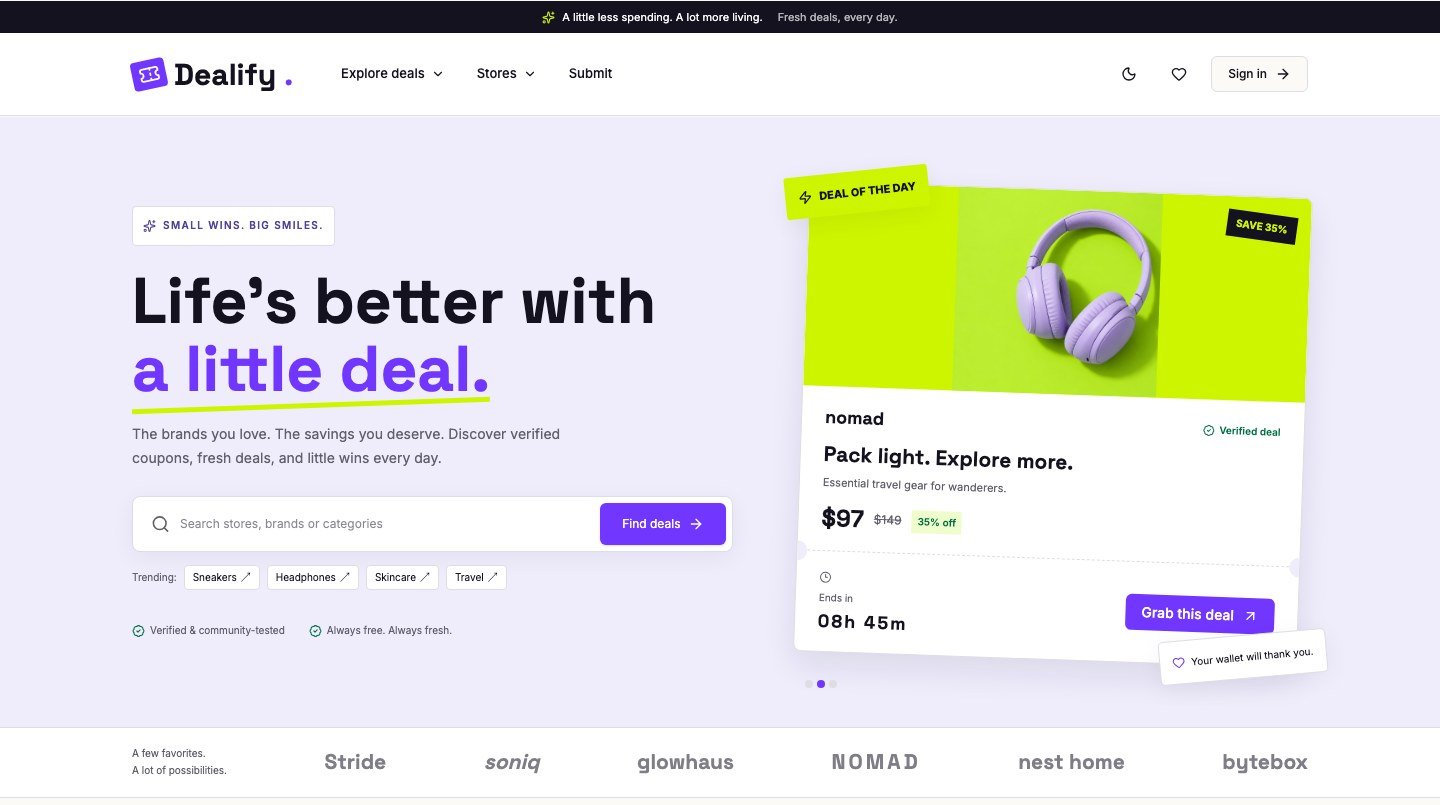
The set-up goes like this.
- Install the theme and its companion plugin, then go to Appearance, One Click Demo Import. That builds the pages, menus, colours and fonts so your site looks like the demo.
- Replace the sample content. The stores, offers, reviews and figures in the demo are examples. Delete them and add your own, using only offers and merchant details you've checked. Leaving invented content up is the quickest way to lose trust.
- Add your stores. Each store gets a website, shipping and returns information and a few FAQs. Fill these in properly; a store page with real details is useful in a way a bare list of codes isn't.
- Add offers. Each offer takes a code or a deal, a discount, an expiry date, terms and its own link. "Get deal" opens the offer's link, or the store's website if the offer has none, so put your affiliate link on each offer.
- Check the Usage screen after a few days. Every reveal, copy and visit is recorded with the offer and the time. Guests are stored only as a one-way hash, not as identifiable records.
The Dealify documentation covers each of these in more detail, including the forms and enquiries.
Step 5: keep the codes fresh
This is what separates a site people return to from one they leave after a single failed code. A routine helps.
Put an expiry date on every offer, and treat a missing one as a problem. Once a week, go through the offers that have been revealed most and test their codes. Take down anything that fails. Mark the ones you've checked as verified, and only use that label when it's true.
Dealify also has a form where shoppers can submit coupons, and the submissions land in your dashboard for review. Treat them as leads, not as content. Test every code yourself before it goes live.
Step 6: disclose your links, and say so plainly
If you earn a commission, you have a financial relationship with the store, and your visitors should know. In the US, the Federal Trade Commission's guidance on endorsements says a disclosure should sit with the thing it's about, be hard to miss, and use clear words such as "ad" or a plain sentence. Burying it in a footer or behind a click isn't enough. Other countries have similar rules, so check the ones that apply to you.
In practice: put a short line near your offers that says you may earn a commission if someone buys through your links, and keep a longer affiliate disclosure page. Dealify includes a page for this to adapt.
There is also the question of how your links are marked up for search engines. Google's documentation says to use rel="sponsored" for advertisements and paid placements, and nofollow when you don't want to pass on trust. It doesn't mention affiliate links by name, so reading them as paid placements is a judgement call, but it's the cautious one. I haven't checked which rel values Dealify puts on its outbound links by default, so look at the page source of the demo or your own site and add the attribute if it's missing.
Step 7: give people a reason to be on your site
Google's spam policy describes "thin affiliation": pages full of affiliate links whose text is copied straight from the merchant. Pages like that are what it wants to demote. A coupon site can avoid it by adding something the store's own page doesn't have.
That might be a store page with honest notes on shipping and returns, a collection like "back to university deals," a short saving tip on the blog, or your own comment on whether a discount is any good. Dealify has places for each of those: store pages, collections, a blog with saving tips and a help centre. They only help if you fill them with real writing.
What about structured data?
It's tempting to mark every offer up as a product with a price. As far as I can tell from Google's documentation, product markup is meant for pages where the product can be bought, and I couldn't find a rich result designed for coupon listings. Marking up an offer you only link to as a product risks being treated as misleading. Safer markup includes your organisation, breadcrumbs and article markup for your blog posts, and being careful to keep anything you mark up true.
Mistakes that cost the most
- Building the whole site before checking whether the stores will approve you.
- Leaving demo or sample content live.
- Showing expired offers, or codes nobody has tested.
- Copying a merchant's description instead of writing your own.
- Hiding the disclosure.
- Measuring visits instead of purchases.
Questions people ask
Do I need Elementor Pro?
Not for Dealify, which works with the free Elementor plugin. If you build from general parts, check what each plugin needs.
Can I use my own affiliate links?
Yes. In Dealify each offer can have its own deal or affiliate link, and each store its own website. "Get deal" opens the offer's link, or the store's website if the offer has none.
How do I know which coupons people use?
Dealify records every reveal, copy and visit against the offer, and you can see it under the Usage screen in the admin. Guests are stored only as a one-way hash.
Can visitors submit coupons?
Yes, through a submission form. They're saved in your dashboard for you to review before anything goes live.
How much can a coupon site earn?
I can't give you a number, and I'd distrust anyone who does. It depends on your niche, the commission rates, how much traffic you attract and how many of those people buy.
Disclosure: Wow Themes makes Dealify. The product details above come from its product page and documentation, and the guidance on disclosure and search comes from the FTC and Google documentation read on 19 November 2026.

Written by
The people behind Wow Themes
The Wow Themes team builds and supports WordPress themes and plugins, plus Vue and React templates. On the blog we write about building, running and securing websites: WordPress and WooCommerce, JavaScript, performance and the tools we use day to day.



Comments
No comments yet. Be the first to share your thoughts.